Score your feed.
Draft in your voice.
Post by hand.
Reads the posts on your screen, scores each one against a thesis and rubric you write, and drafts a reply worth sending — you edit, copy, and post it yourself. Nothing goes out without you.
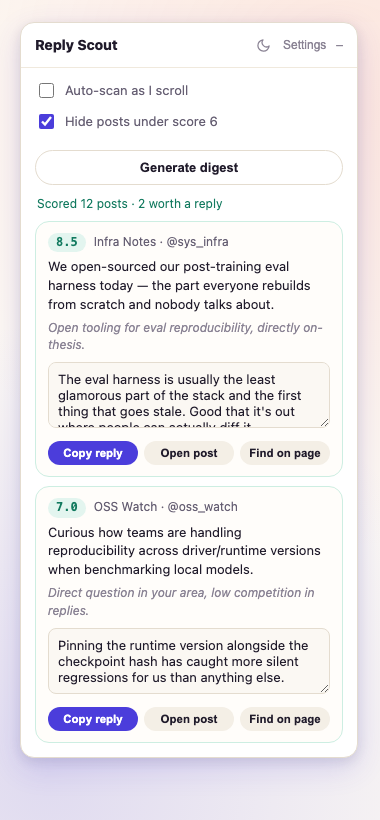
Ten minutes, not an hour of scrolling.
One button scores what's on screen. You decide what actually gets a reply.
Scan visible posts
Up to 15 posts on screen get scored against your thesis and rubric, right where you are — Home or any List.
Review, sorted by score
Each result comes with why it scored that way, and a drafted reply for anything worth engaging.
Edit, copy, post
You're always the last filter. Edit the draft, copy it, paste it on the real post, and send it yourself.
It scores against your judgment, not ours.
Thesis, rubric, digest focus, and voice samples are plain text you write and edit in settings. Nothing is fixed — the same signal colors the panel uses to sort your feed are yours to define.
Thesis & rubric
The one or two sentences you'd defend in every reply, and exactly how a post earns a high score against it.
Voice samples
Paste 3–8 real posts you've written. Real examples beat any style instruction — this is what keeps drafts sounding like you.
Your key, your machine, your choice.
Anthropic API
Bring your own key. Full vision support for image-heavy posts, one small request per scan.
Local via LM Studio
Point it at your own server and nothing leaves your machine. Works with reasoning-aware models via a token-budget-safe scoring path.
Two minutes, unpacked.
- Download or clone the repo, and unzip it somewhere permanent.
- Open
chrome://extensions, turn on Developer mode. - Click Load unpacked and select the
reply-scoutfolder. - Open settings from the panel: add your API key (or switch to Local), edit the thesis and rubric, paste in voice samples.
- Go to x.com — the panel appears top-right on Home and Lists.